Instrument Garmin watch face, Analog Aviation Watch Face
QR code for Instrument on the Connect IQ Store

Scan to open in Connect IQ

Instrument

Analog
Get it on Connect IQ Store

Analog Aviation Watch Face

Read your vitals like a cockpit gauge.

More about this design

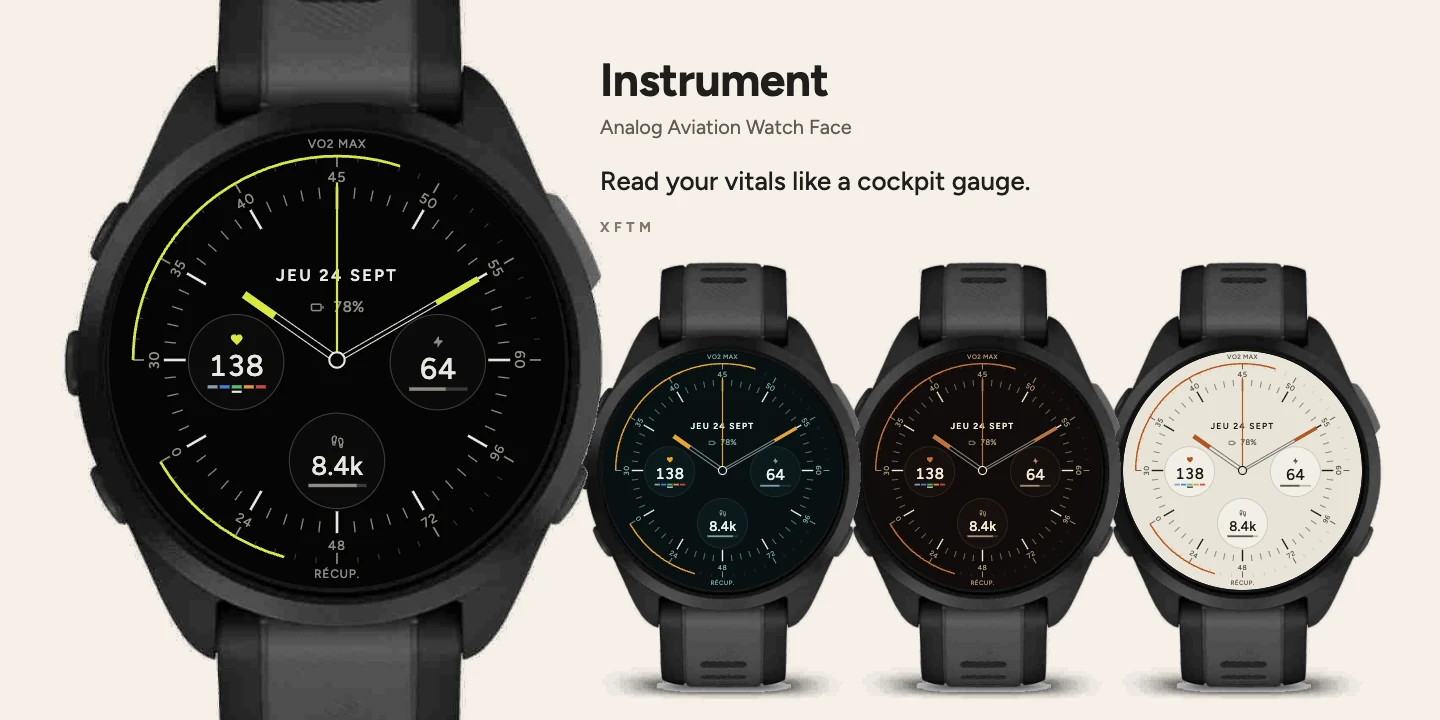
A minimalist analog Garmin watch face inspired by aircraft instrument dials, showing VO2 max, recovery time, heart rate, Body Battery and steps at a glance.

Instrument borrows its grammar from aircraft dials. Two curved scales occupy the rim: VO2 max across the top, 30 to 60, recovery hours across the bottom, 0 to 96, figures set tangent to their arc with an accent segment marking the value reached.

At the centre, three sub-dials — heart rate with its five zones, Body Battery, steps — and hands tipped with the accent colour. Both scales and the minute ring share a single tick grid: every scale mark falls on a minute, every major one on an hour.

7 colourways, settable from Garmin Connect and from the watch itself, through the face's own settings menu.
Yeobaek Garmin watch face, Minimalist Watch Face
QR code for Yeobaek on the Connect IQ Store

Scan to open in Connect IQ

Yeobaek

Simple
Get it on Connect IQ Store

Minimalist Watch Face

Nothing more than what matters.

More about this design

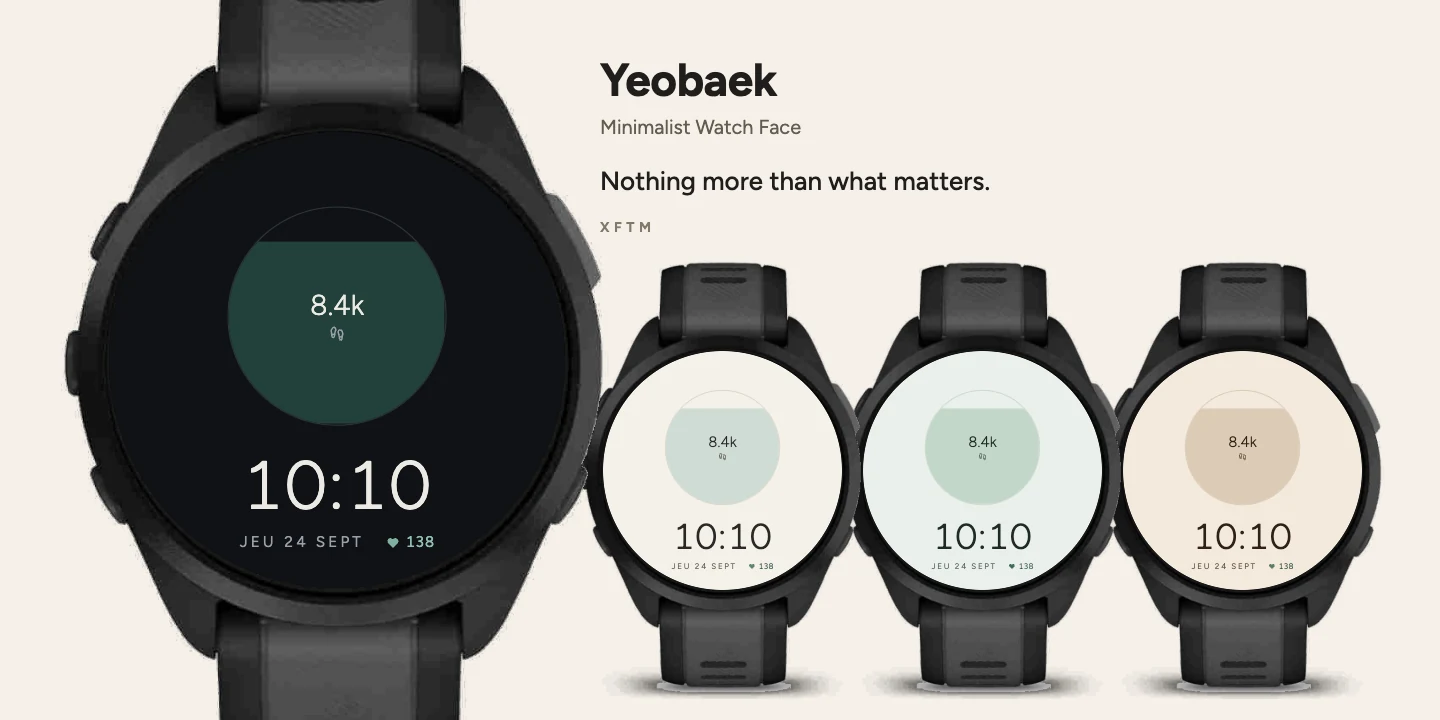
An ultra-minimalist Garmin watch face that shows only steps, time, date and heart rate, with generous empty space instead of clutter.

Yeobaek deliberately shows four things and nothing else: a jar filling with your steps, the time, the date, heart rate.

The time is small, thin, set low. The emptiness above it is not a space to fill: it is the composition itself. Do not look for another reading, there is none.

5 materials, settable from Garmin Connect and from the watch itself, through the face's own settings menu.

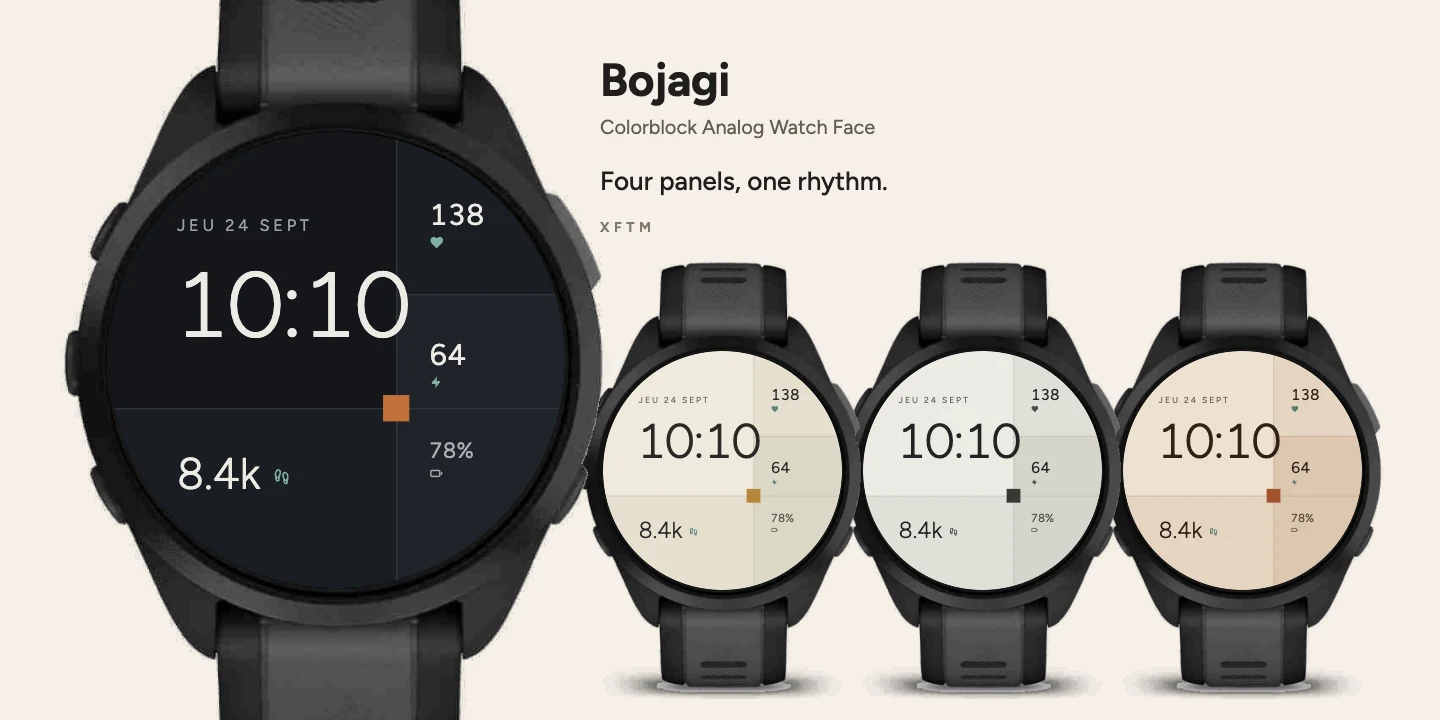
Bojagi Garmin watch face, Colorblock Analog Watch Face
QR code for Bojagi on the Connect IQ Store

Scan to open in Connect IQ

Bojagi

Stylish
Get it on Connect IQ Store

Colorblock Analog Watch Face

Four panels, one rhythm.

More about this design

A colorblock analog Garmin watch face built from four stitched panels, showing time, date, heart rate, Body Battery, battery and steps.

Bojagi stitches four unequal panels in three neighbouring tones, one-pixel seams left visible, a square of ochre at the crossing. Their unlikeness is the drawing.

Each panel holds one thing only: the time and date on the left, heart rate, Body Battery and battery in a right-hand column, steps at the foot.

5 materials, settable from Garmin Connect and from the watch itself, through the face's own settings menu.

This face is offered on AMOLED screens only. Its three panel tones are separated by a ratio of 1.07 to 1.13; a MIP screen's 64 colours hold no light, neutral triple at those ratios, and the drawing would no longer mean anything there. That rules out fēnix 7, fēnix 9 Pro Solar and Forerunner 255 and 955. The Yeobaek face is available on them.

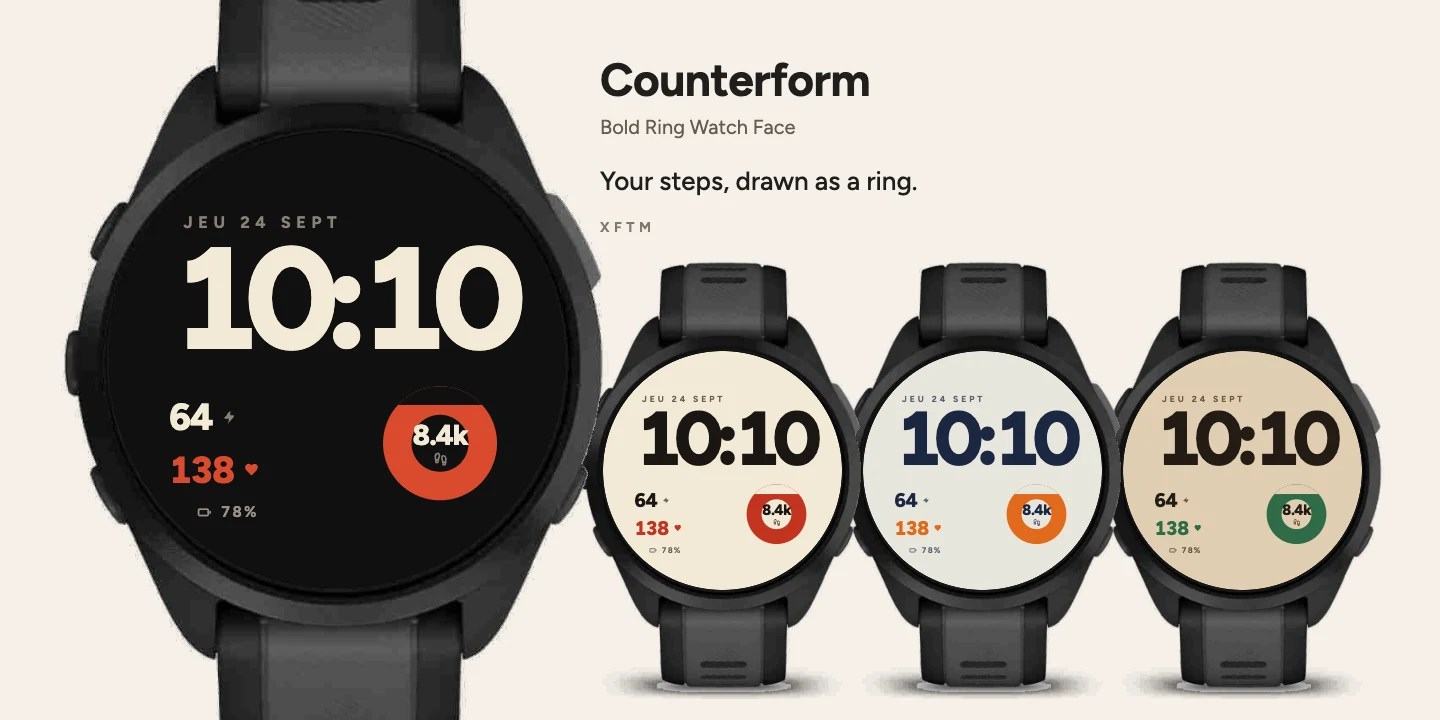
Counterform Garmin watch face, Bold Ring Watch Face
QR code for Counterform on the Connect IQ Store

Scan to open in Connect IQ

Counterform

Stylish
Get it on Connect IQ Store

Bold Ring Watch Face

Your steps, drawn as a ring.

More about this design

A bold digital Garmin watch face with a thick progress ring that fills with your daily steps, plus heart rate, Body Battery and battery.

Counterform detaches a thick ring from the time, in accent ink, whose void fills from below as the day's steps accumulate. It carries the count at its centre: a typographic mark doing duty as a dial.

The time sits left, in tight heavy type. Two readings follow in a column — Body Battery and heart rate — then the watch battery.

6 inks, settable from Garmin Connect and from the watch itself, through the face's own settings menu.

Ligature Garmin watch face, Bold Typographic Watch Face
QR code for Ligature on the Connect IQ Store

Scan to open in Connect IQ

Ligature

Stylish
Get it on Connect IQ Store

Bold Typographic Watch Face

Time, set in bold type.

More about this design

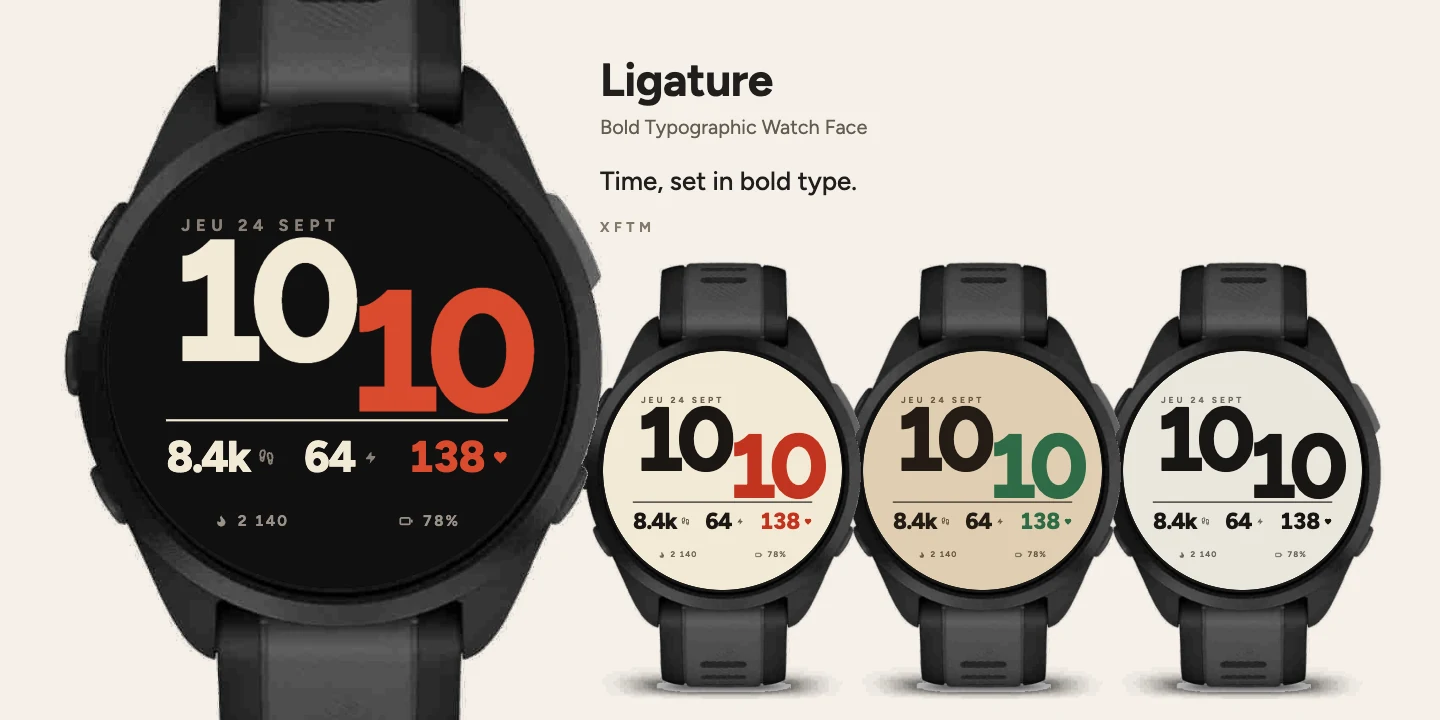
A bold typographic Garmin watch face where heavy type composes the time itself, with steps, Body Battery, heart rate, calories and battery below.

Ligature does not place the time, it composes it: heavy type set tight to the point of contact, the minutes pair dropped a baseline and carried by a screenprint accent ink.

Below a rule, three readings — steps, Body Battery, heart rate — each announced by its pictogram. The foot line gives calories and battery.

6 inks, settable from Garmin Connect and from the watch itself, through the face's own settings menu.

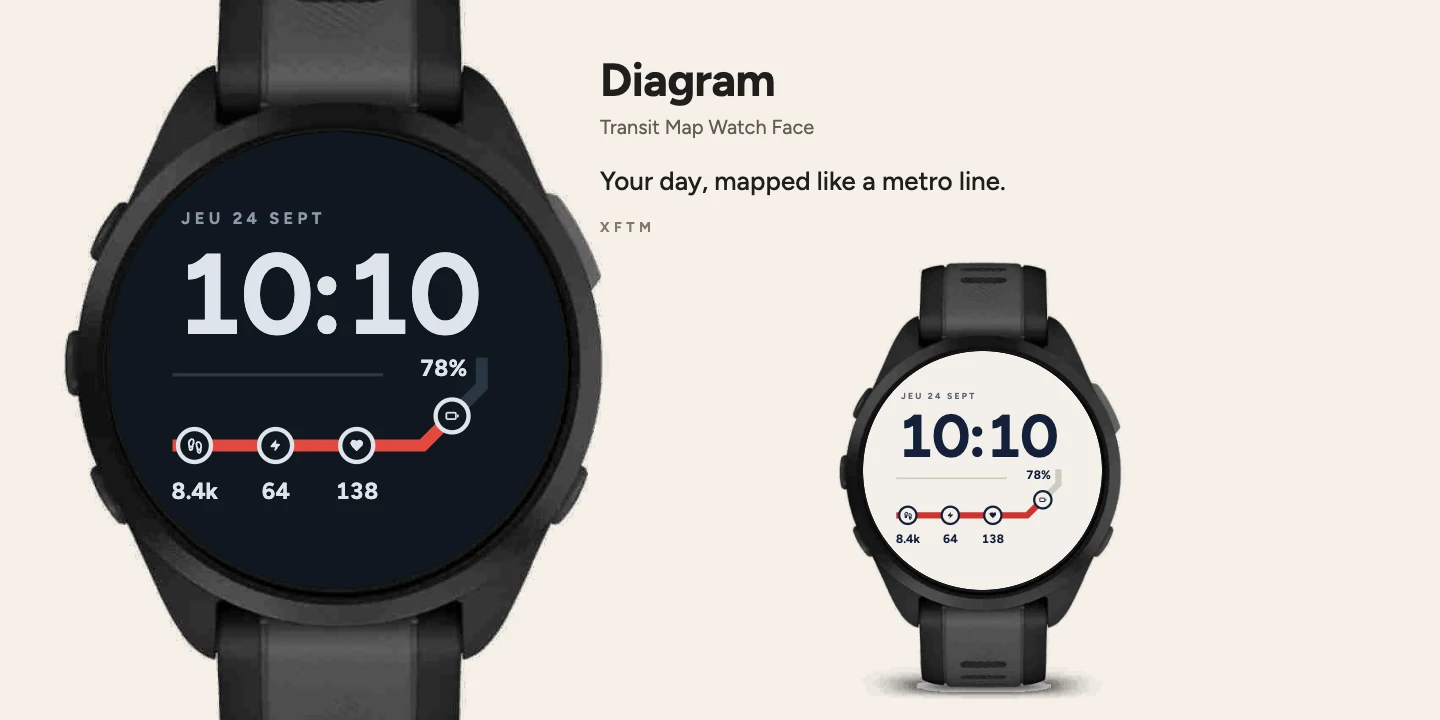
Diagram Garmin watch face, Transit Map Watch Face
QR code for Diagram on the Connect IQ Store

Scan to open in Connect IQ

Diagram

Stylish
Get it on Connect IQ Store

Transit Map Watch Face

Your day, mapped like a metro line.

More about this design

A Garmin watch face styled like a subway map, where your steps fill a red route line across four stations: steps, Body Battery, heart rate and battery.

Diagram borrows its grammar from network maps: a route with no angles other than 0, 90 and 45 degrees, square ends, four interchanges.

The red portion of the line advances with your steps, from the start to the terminus. Each interchange carries its pictogram and its value: steps, Body Battery, heart rate, watch battery.

2 colourways, settable from Garmin Connect and from the watch itself, through the face's own settings menu.
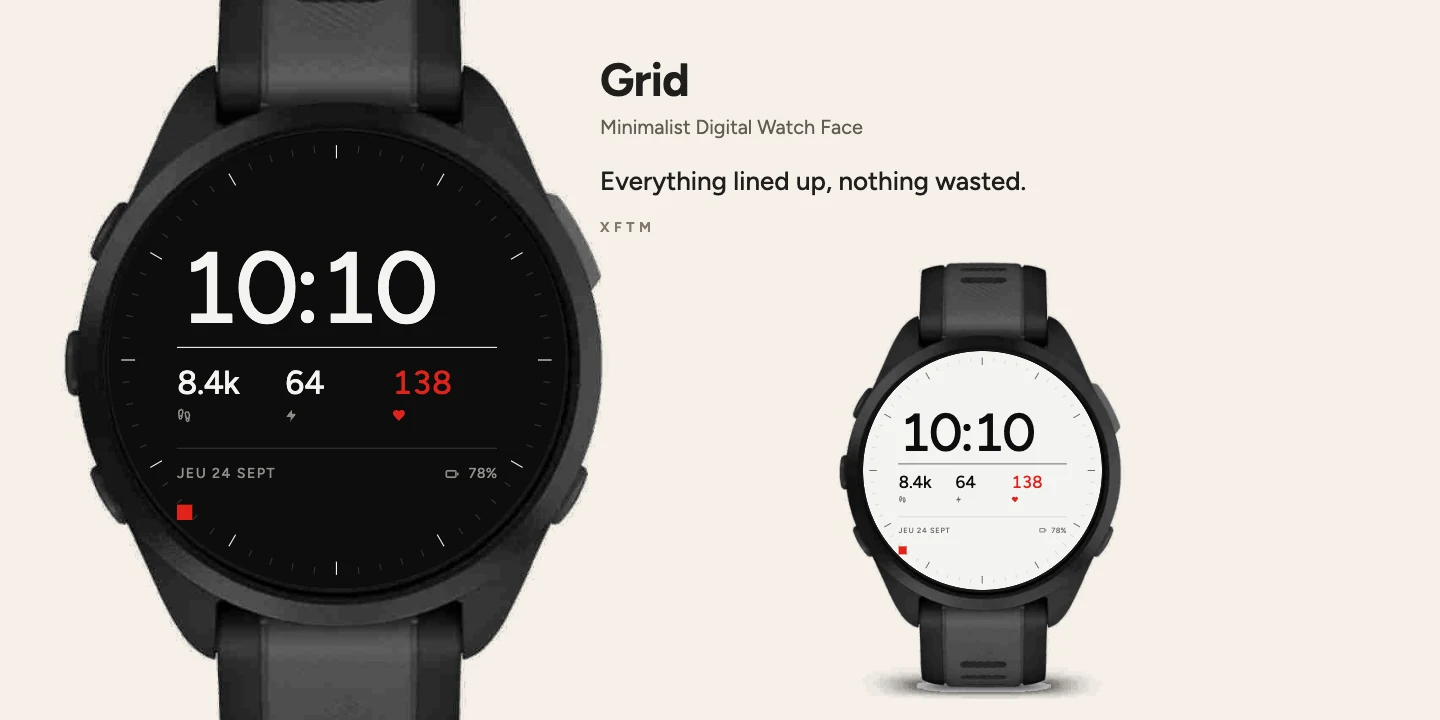
Grid Garmin watch face, Minimalist Digital Watch Face
QR code for Grid on the Connect IQ Store

Scan to open in Connect IQ

Grid

Stylish
Get it on Connect IQ Store

Minimalist Digital Watch Face

Everything lined up, nothing wasted.

More about this design

A clean grid-layout Garmin watch face with steps, Body Battery, heart rate, date and battery, and a red second-hand square as the only moving element.

Grid is an exercise in layout: a margin held to the pixel, everything flush left, two rules organising the page. The time dominates, three readings follow — steps, Body Battery, heart rate — then the date and battery at the foot.

A red square crosses the grid in one minute: that is the second hand, and the only moving part. Sixty ticks mark the minutes at the rim.

2 colourways, settable from Garmin Connect and from the watch itself, through the face's own settings menu.
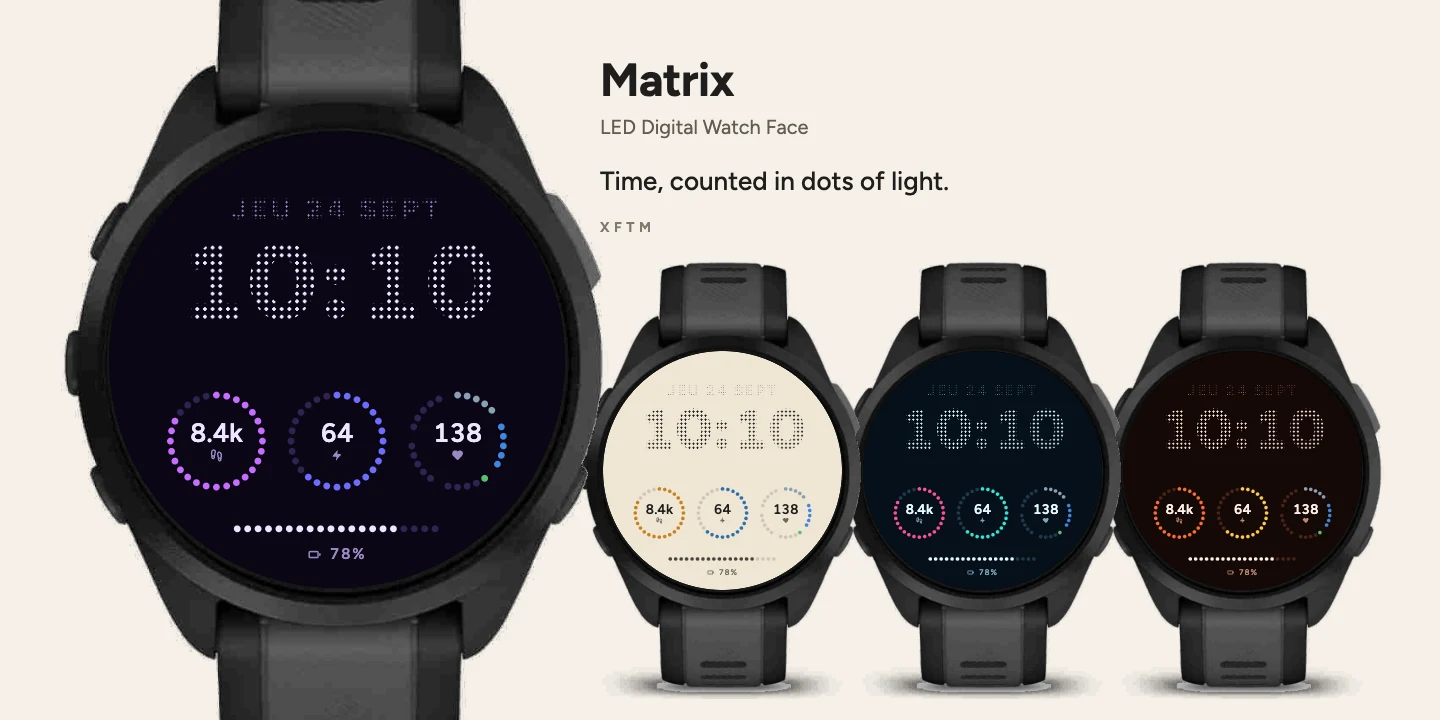
Matrix Garmin watch face, LED Digital Watch Face
QR code for Matrix on the Connect IQ Store

Scan to open in Connect IQ

Matrix

Digital
Get it on Connect IQ Store

LED Digital Watch Face

Time, counted in dots of light.

More about this design

A retro LED-style Garmin digital watch face with dot-matrix counters for steps, Body Battery and heart rate, plus a color-coded heart rate zone ring.

Matrix punches the time and date like an LED display. Three dot counters carry steps, Body Battery and heart rate — you count lit dots, you do not read a length.

The heart-rate ring changes colour zone by zone, in the watch's own zone colours. A twenty-dot bar closes the face with the battery.

14 colourways, settable from Garmin Connect and from the watch itself, through the face's own settings menu.
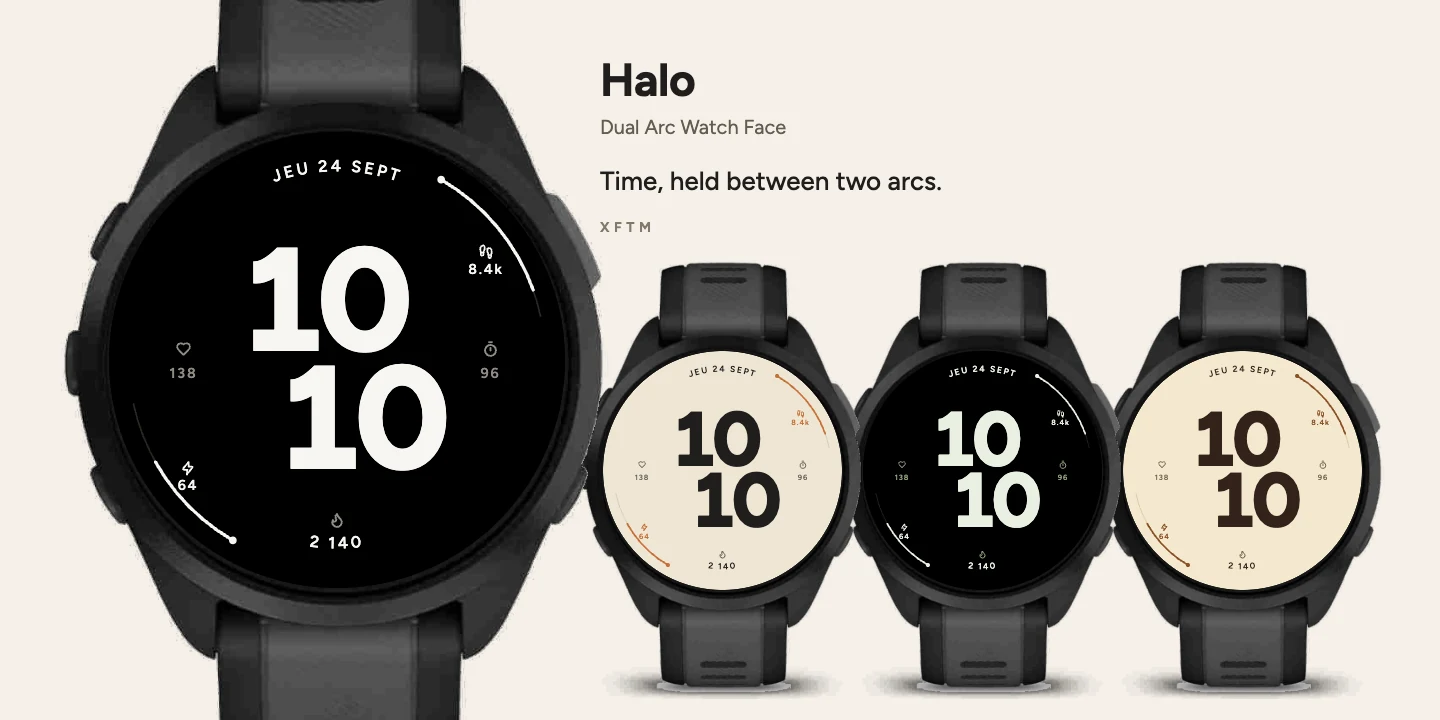
Halo Garmin watch face, Dual Arc Watch Face
QR code for Halo on the Connect IQ Store

Scan to open in Connect IQ

Halo

Stylish
Get it on Connect IQ Store

Dual Arc Watch Face

Time, held between two arcs.

More about this design

A Garmin watch face with two heavy stacked time lines and dual arcs tracking steps and Body Battery, plus heart rate, intensity minutes and calories.

Ring sets the time in two heavy stacked lines, the second offset, in the middle of the glass. The date follows the curve along the top and calories answer it along the bottom — every letter turned to its own angle.

Two arcs at the rim carry steps and Body Battery; the flanks hold heart rate and intensity minutes. No captions: the pictogram is enough.

Eight colourways: Earth, Sage, Brick, Duo, Night, Ember, Forest, Indigo. They can be set from Garmin Connect and from the watch itself, through the face's own settings menu.

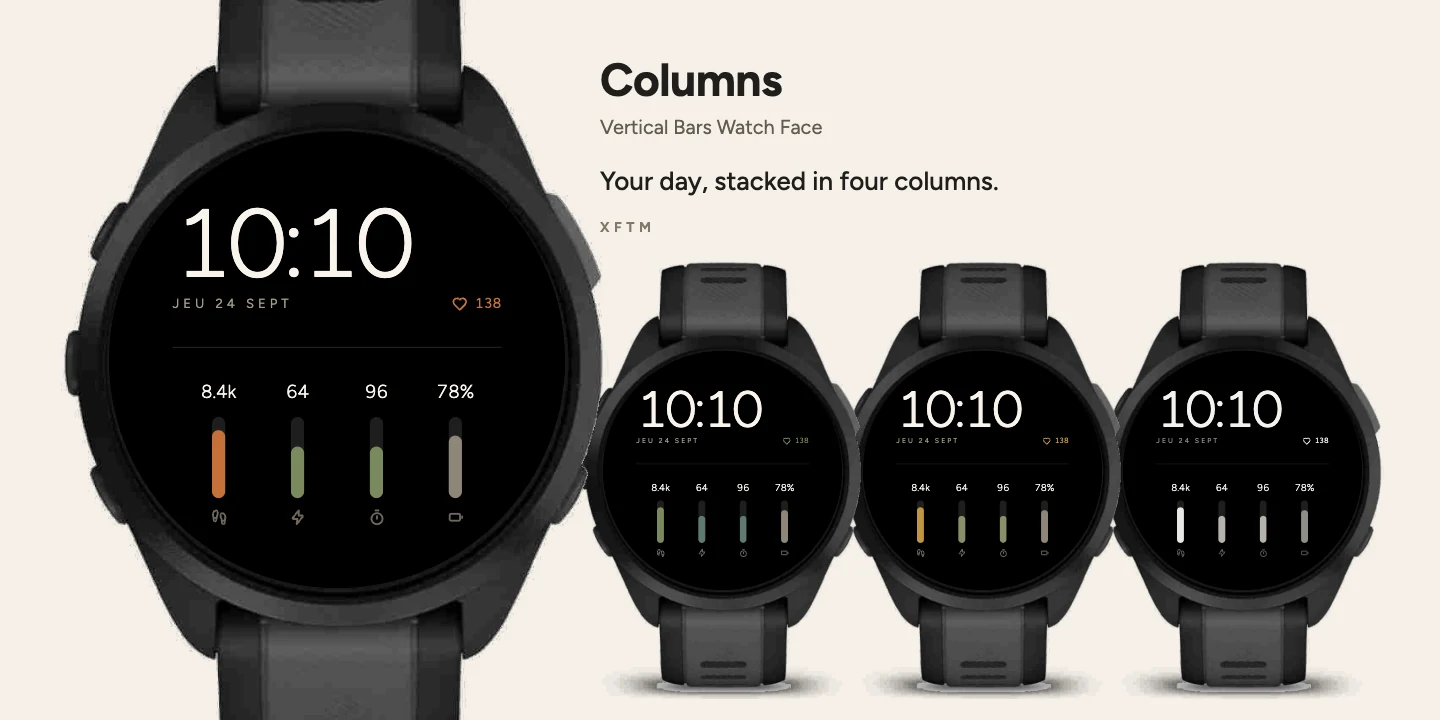
Columns Garmin watch face, Vertical Bars Watch Face
QR code for Columns on the Connect IQ Store

Scan to open in Connect IQ

Columns

Digital
Get it on Connect IQ Store

Vertical Bars Watch Face

Your day, stacked in four columns.

More about this design

A Garmin watch face that shows steps, Body Battery, intensity minutes and battery as four clean vertical bar gauges, with no text abbreviations.

Columns gives four readings as vertical gauges: steps, Body Battery, intensity minutes and watch battery. The value sits on top, the pictogram at the foot, and nothing in between.

No text abbreviations under the bars — that is the whole point of this face.

Four colourways: Earth, Sage, Copper, Ink. They can be set from Garmin Connect and from the watch itself, through the face's own settings menu.

Bands Garmin watch face, Digital Status Watch Face
QR code for Bands on the Connect IQ Store

Scan to open in Connect IQ

Bands

Digital
Get it on Connect IQ Store

Digital Status Watch Face

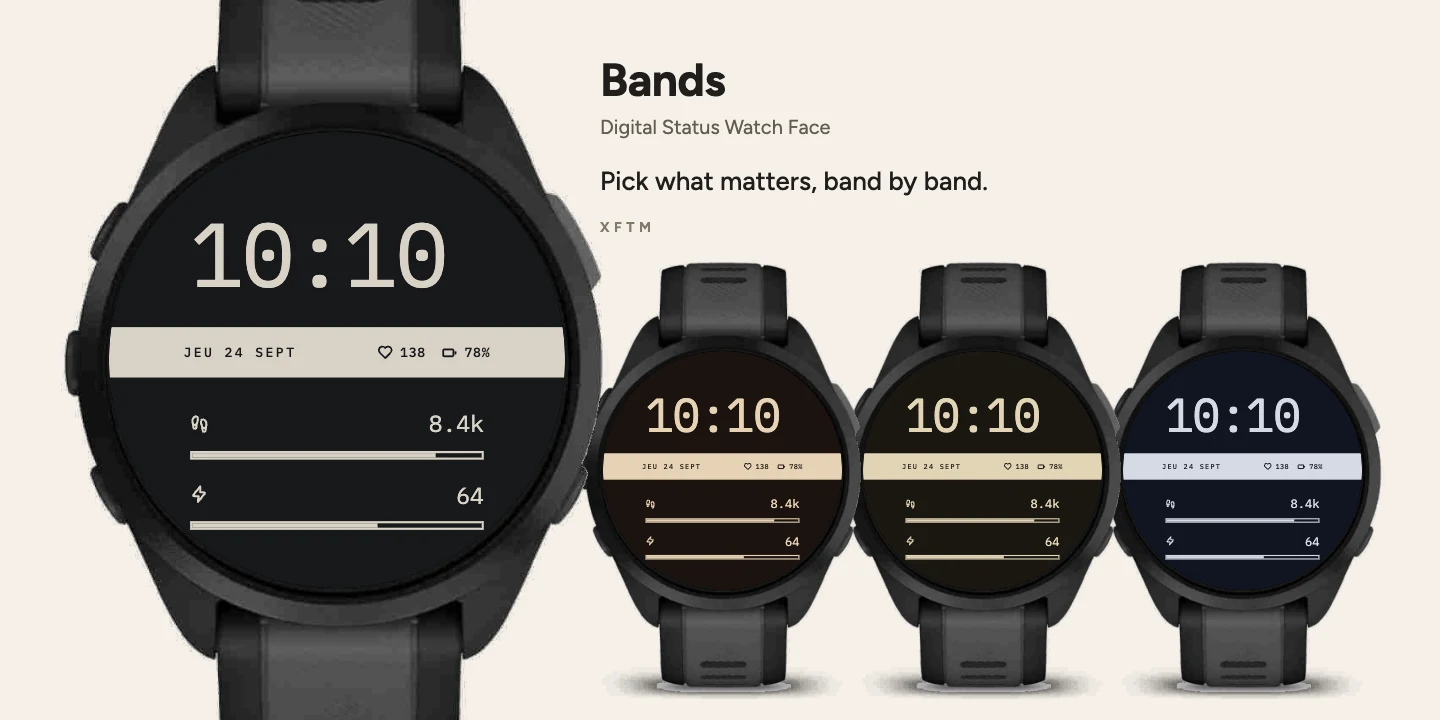
Pick what matters, band by band.

More about this design

A Garmin watch face with a full-width status band and two customizable slots for steps, Body Battery, intensity minutes or calories.

Bands puts the time up top, a full-width status band across the middle, and two slots below.

Those two slots are configurable: steps, Body Battery, intensity minutes or calories, each chosen independently. That is what this face is for.

Asleep, only the time and a single rule remain.

Four colourways: Night, Sage, Copper, Slate. They can be set from Garmin Connect and from the watch itself, through the face's own settings menu.

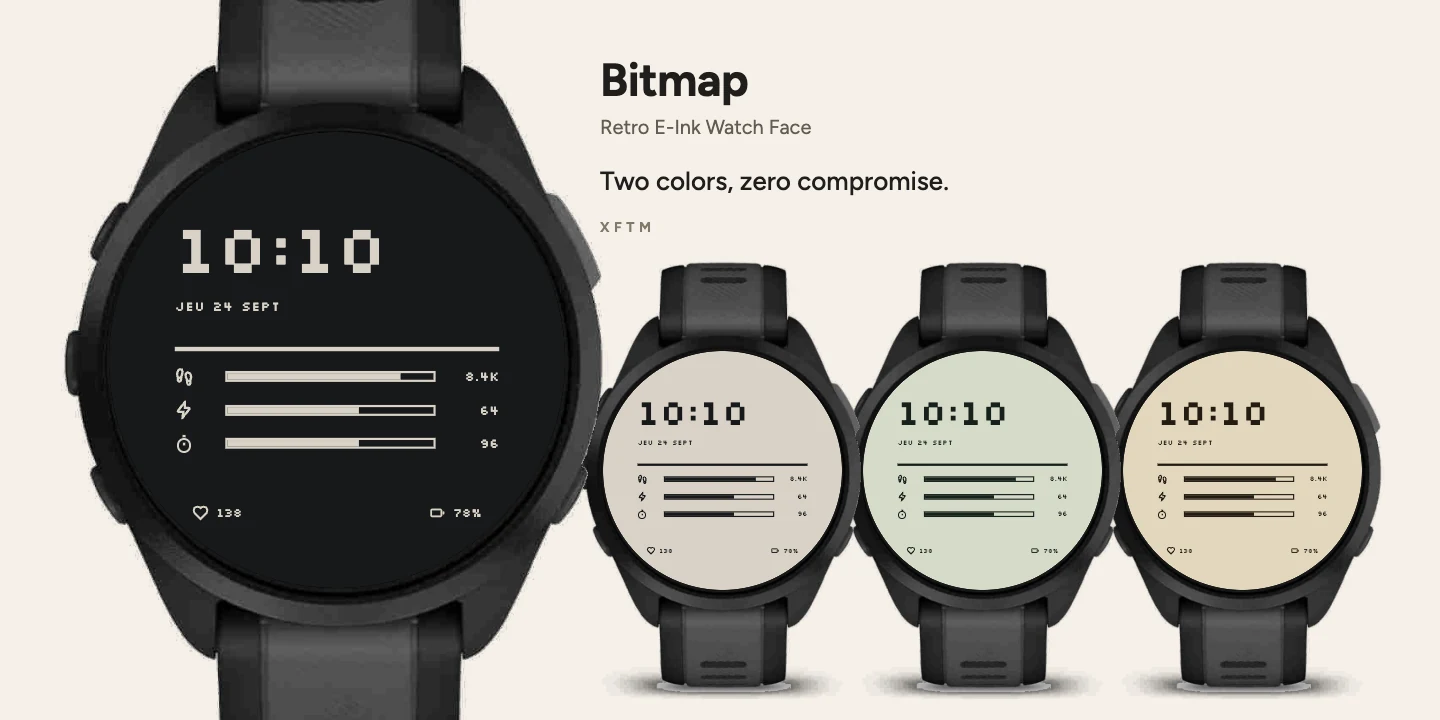
Bitmap Garmin watch face, Retro E-Ink Watch Face
QR code for Bitmap on the Connect IQ Store

Scan to open in Connect IQ

Bitmap

Retro
Get it on Connect IQ Store

Retro E-Ink Watch Face

Two colors, zero compromise.

More about this design

A retro two-color e-ink style Garmin watch face with pixel typography and hard edges, no gradients, that fully inverts in sleep mode.

Bitmap imitates an electronic-ink watch: two colours in all, no intermediate greys, no gradients. Pixel type, framed gauges, hard edges.

Asleep the screen inverts completely — the background becomes the ink — with nothing removed.

Four colourways: Paper, Sage, Copper, Slate. They can be set from Garmin Connect and from the watch itself, through the face's own settings menu.

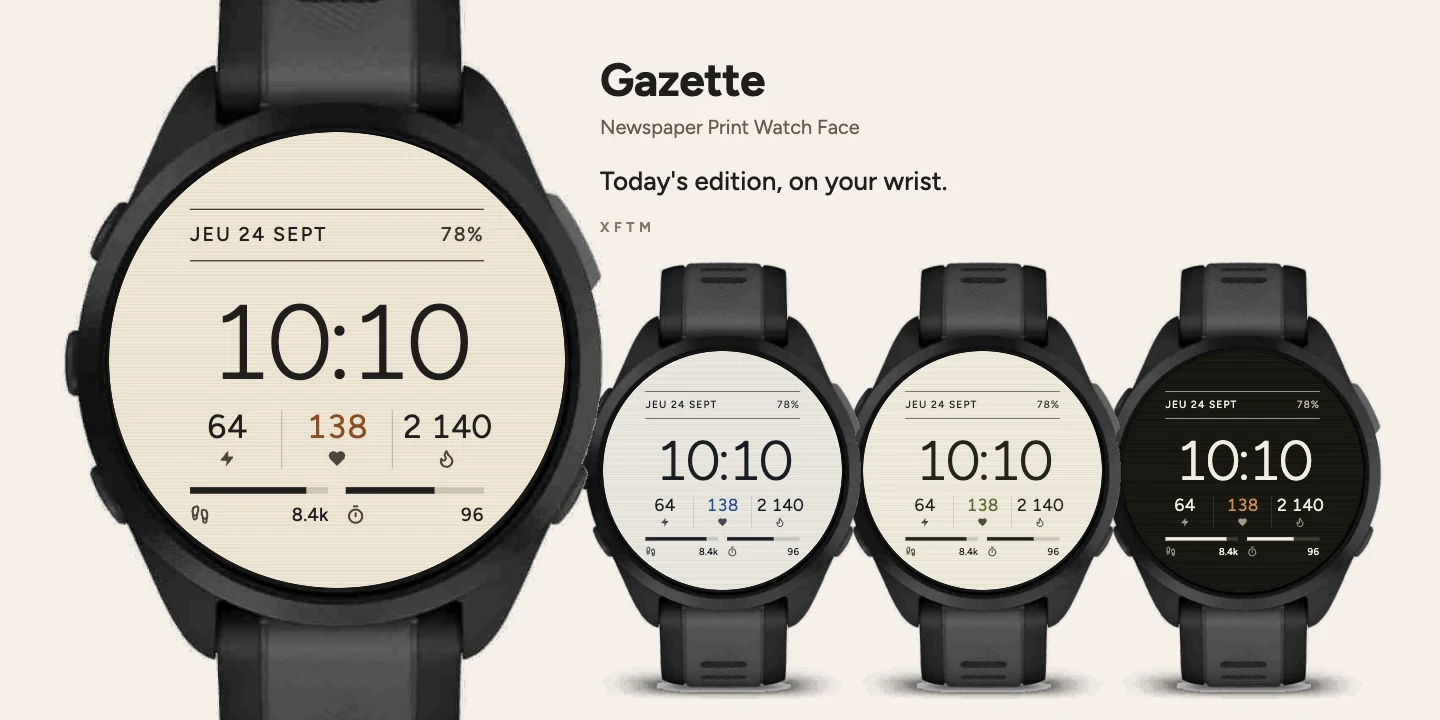
Gazette Garmin watch face, Newspaper Print Watch Face
QR code for Gazette on the Connect IQ Store

Scan to open in Connect IQ

Gazette

Simple
Get it on Connect IQ Store

Newspaper Print Watch Face

Today's edition, on your wrist.

More about this design

A newspaper-style Garmin watch face with a masthead, ruled columns and adjustable text size, showing Body Battery, heart rate, calories, steps and intensity minutes.

Gazette lays your day out like a newspaper page: the masthead carries the date and battery between two rules, the time dominates, then three columns — Body Battery, heart rate, calories — divided by vertical rules. Two gauges close the page with steps and intensity minutes.

No text captions: a pictogram under each reading is enough.

5 inks and 3 text sizes, settable from Garmin Connect and from the watch itself, through the face's own settings menu.
New: text size is adjustable. Three tiers — Compact, Comfort, Large — each raising size, weight and second-rank contrast together. Compact reproduces the previous version exactly: if you do not open the settings, nothing changes.

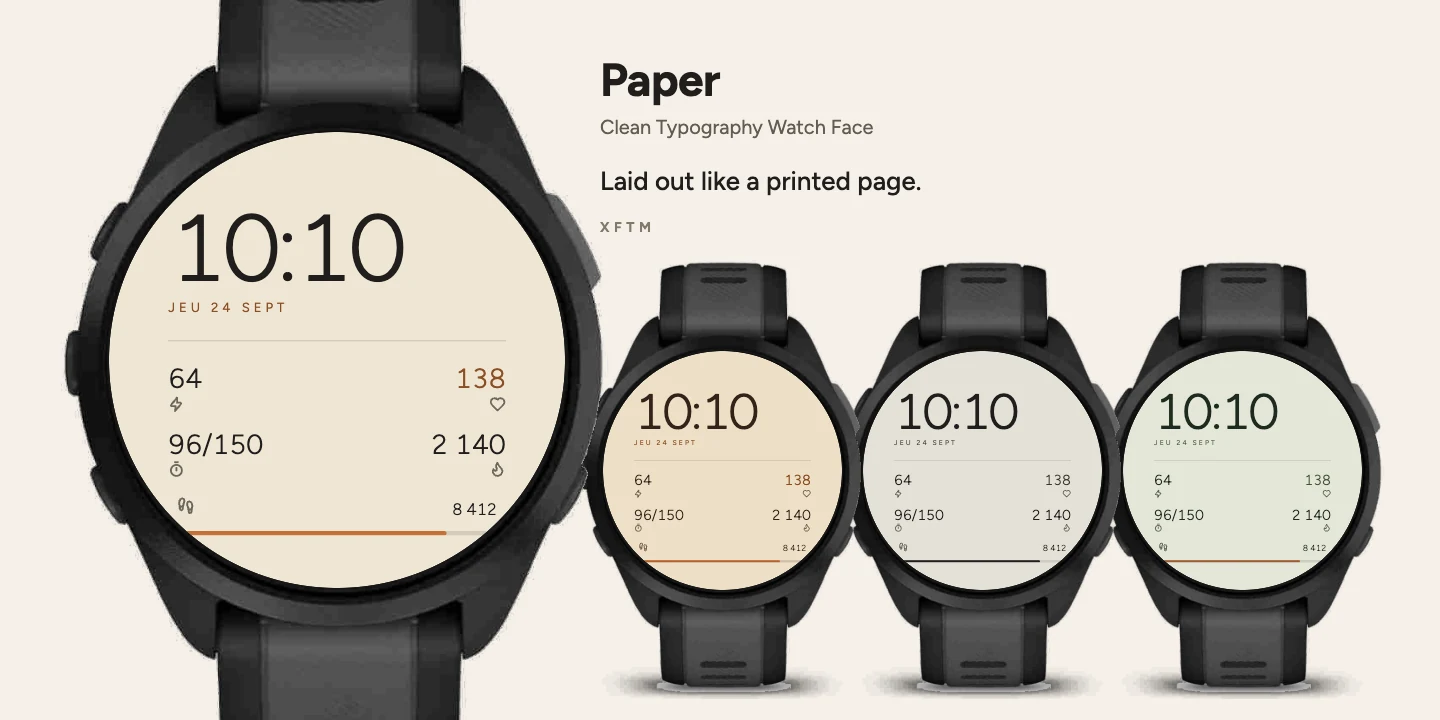
Paper Garmin watch face, Clean Typography Watch Face
QR code for Paper on the Connect IQ Store

Scan to open in Connect IQ

Paper

Simple
Get it on Connect IQ Store

Clean Typography Watch Face

Laid out like a printed page.

More about this design

A minimalist print-style Garmin watch face laid out like a printed page, with flush-left time, spaced date and a clean grid for Body Battery, heart rate, calories and steps.

Paper lays your day out like a printed page: the time flush left, the date in spaced capitals, a rule, then four readings in a grid — Body Battery, heart rate, intensity minutes and calories. Steps close the page with their gauge.

No text labels: one pictogram under each value is enough.

Four colourways: Earth, Sage, Copper, Ink. They can be set from Garmin Connect and from the watch itself, through the face's own settings menu.

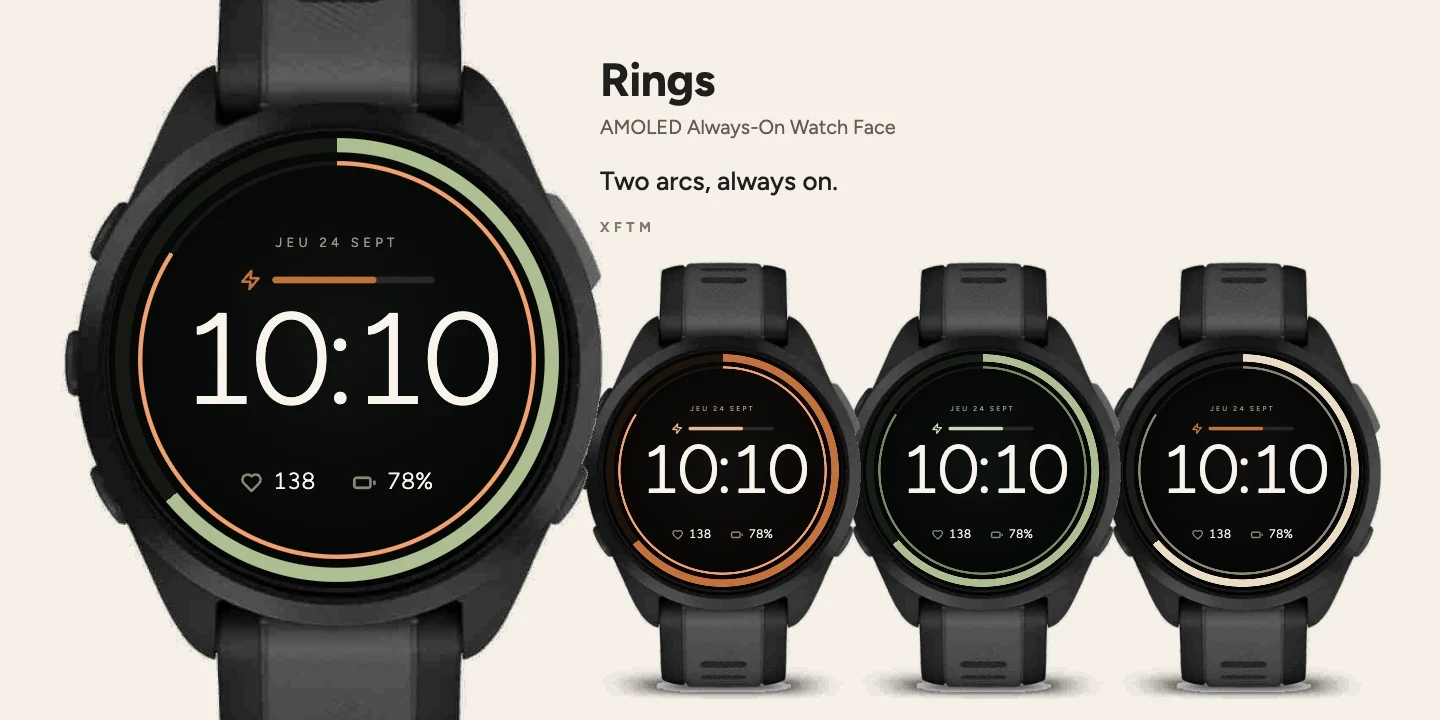
Rings Garmin watch face, AMOLED Always-On Watch Face
QR code for Rings on the Connect IQ Store

Scan to open in Connect IQ

Rings

Simple
Get it on Connect IQ Store

AMOLED Always-On Watch Face

Two arcs, always on.

More about this design

A Garmin watch face with two concentric arcs for Body Battery and steps, always-on AMOLED support, and true black background for zero battery cost.

Rings frames the time with two arcs: steps on the outside, Body Battery within. The date crowns the face, a thin bar carries intensity minutes, and the foot gives heart rate and watch battery.

No captions: every reading is announced by its pictogram. Asleep, only a muted ring, the date and the time remain.

4 colourways, settable from Garmin Connect and from the watch itself, through the face's own settings menu.
Frequently asked questions

Connect IQ is Garmin's platform for adding custom watch faces, apps and data fields to compatible Garmin watches. Every design here is browsable and installable from the Connect IQ Store or the Garmin Connect mobile app.

Yes. Every watch face in this collection is free to download and use. If you enjoy one, buying me a coffee below helps keep new designs coming.

From the Garmin Connect app on your phone, or directly from the watch face's own settings menu on the watch.

Most designs run on fēnix 8 and fēnix 9, including the Pro and Pro Solar models, fēnix 7 and its Pro versions, Forerunner 165, 255, 265, 570, 955, 965 and 970, Venu 3, 3S and 4, and the matching tactix and quatix models. Compatibility varies slightly by watch face, so check the compatible devices list on each design's own Connect IQ Store page before installing.

Open the Connect IQ Store link on your phone with Garmin Connect installed, tap Get, and it syncs to your watch automatically. On desktop, hover any design above to reveal a QR code you can scan directly with your phone.

Each design is built to be lightweight. Always-on styles such as Rings lean on true blacks on AMOLED screens specifically to keep that extra cost as low as possible, but any active watch face uses a little more battery than the stock face.

Most designs ship with several colorways, selectable either from the Garmin Connect app or directly from the watch face's own settings menu on the watch.

Yes. New designs are added over time, so check back on this page or the Connect IQ Store for the latest additions.

Yes, reach out at hello@fxcuissot.com with your watch model and what you would like to see.

Yes, and it genuinely helps. Use the floating button in the corner of this page, or go directly to buymeacoffee.com.